DWG NO. HS-2011-04 // SEQUENCE 1–4 BRIEFING SHEET
SEQUENCE 1–4 // VERIFIED v2.0.11REQUIRED DUMP: 0400486024DEC000 v131072 (e0f3ccfa)

Hookshot Setup Guide, Dump Verification & Options Menu

Follow this four-stage engineering sequence to set up Hookshot v2.0.11 on Windows 10/11 x64 or Linux x86_64 (including Steam Deck). Because NotRexed/Hookshot is a clean-room static recompilation, you must first verify your decrypted Nintendo Switch 2 dump of The Legend of Zelda: Ocarina of Time (Title ID 0400486024DEC000 updated to patch v131072, ExeFS main NSO SHA-1 prefix e0f3ccfa), run HookshotBuilder to extract RomFS assets and compile the native executable, tune the in-game Insert / F1 graphics overlay for your GPU VRAM budget, and manage or migrate saves via scripts/oot_saves.py.

+ FIG 4.0 // SETUP & VRAM PRESETSSCALE 1:1 · REV v2.0.11 +
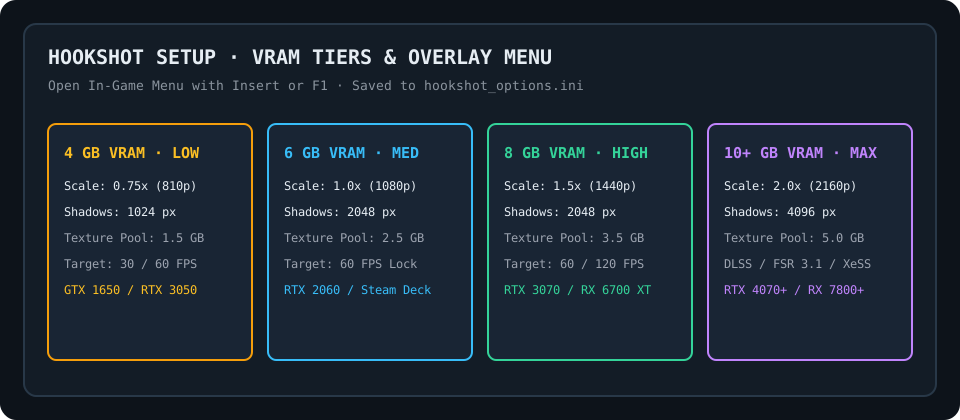
Hookshot v2.0.11 setup guide diagram showing Switch 2 Title ID 0400486024DEC000 v131072 verification, HookshotBuilder asset extraction, Insert/F1 VRAM presets, and oot_saves.py migration.
FIG 4.0 — Hookshot v2.0.11 Dump Verification Pipeline, Insert/F1 Graphics Overlay & VRAM Tier Allocation (4 GB to 10+ GB)
SEQUENCE 1–4 // MANDATORY INSTALLATION & CONFIGURATION ORDERDISK BUDGET: ~26.2 GB UNPACKED ROMFS · BUILD TIME: 10–45 MIN

Four-Step Build & Configuration Rail (Sequence 1–4)

SEQUENCE 01 // DUMP VERIFICATIONSHA-1: e0f3ccfa…

Verify Switch 2 Dump (Title ID 0400486024DEC000 v131072)

Prepare your legally dumped Switch 2 remake of Ocarina of Time as either a single merged .nup bundle or an extracted directory containing romfs/ and exefs/. Hookshot checks seven dump signals and requires Title ID 0400486024DEC000 at update v131072 with ExeFS main NSO build ID e0f3ccfa56256410941279ef0b2501356be2222c.

TitleID 0400486024DEC000 / v131072
Build ID e0f3ccfa56256410941279ef0b2501356be2222c
SEQUENCE 02 // BUILDER EXECUTION10–45 MIN ONE-TIME BUILD

Run HookshotBuilder.exe (Windows) or AppImage (Linux)

On Windows, place HookshotBuilder.exe in an ASCII/UTF-8 writable folder (v2.0.11 fixes non-ASCII path issues #1176) and select your dump; it automatically fetches builder-parts and compiles hookshot.exe. On Linux/Steam Deck, run chmod +x Hookshot-v2.0.11-x86_64.AppImage and launch it to unpack work/dump/ and link the binary.

HookshotBuilder.exe / AppImage --extract
Generates Hookshot binary + assets/ folder
SEQUENCE 03 // INSERT / F1 OVERLAYHOTKEY: INSERT OR F1

Configure Graphics Preset, Upscaler (DLSS / FSR 3.1) & Controls

Press Insert or F1 in-game to open the Dear ImGui configuration overlay. Match graphics_preset to your physical VRAM (Low = 4 GB, Medium = 6 GB, High = 8 GB, Max = 10+ GB), select Native TAA, NVIDIA DLSS, AMD FSR 3.1, or Intel XeSS, set framerate target to 60/120 FPS, and configure SDL3 controller glyphs and gyro aiming.

graphics_preset / upscaler_mode / fps_limit
Medium Preset · 60 FPS · Native TAA / FSR 3.1
SEQUENCE 04 // SAVE MIGRATIONsave_00.sav – save_02.sav

Backup & Convert Saves with scripts/oot_saves.py

Hookshot stores three 64 KB manual save slots (save_00.sav to save_02.sav) plus autosave.sav inside %APPDATA%/Hookshot/saves (Windows) or ~/.local/share/Hookshot/saves (Linux). Run python scripts/oot_saves.py to transfer saves bidirectionally between Hookshot and Switch 2 emulators (Lichii, Eglantine, Orchid, NX2navi) with automatic backups.

scripts/oot_saves.py (export-json / import-json / verify)
%APPDATA%/Hookshot/saves or ~/.local/share/Hookshot/saves
KPI-SET-01 // TITLE IDENTITY
0400486024DEC000
Required Switch 2 Title ID
Must include merged patch v131072 (v1.0.2 update)
KPI-SET-02 // NSO BUILD ID
e0f3ccfa
ExeFS main NSO SHA-1 Prefix
Full hash: e0f3ccfa56256410941279ef0b2501356be2222c
KPI-SET-03 // IN-GAME OVERLAY
Insert / F1
Live Graphics & Input Menu
Tunes Low–Max VRAM presets, DLSS/FSR 3.1/XeSS, and 60–120 FPS
KPI-SET-04 // SAVE CONVERTER
oot_saves.py
Bidirectional Save Tool
Migrates 64 KB save_00.sav files across Hookshot & Switch 2 emulators
CONFIGURATION & CONTROLS LEDGER // 10 VERIFIED RECORDS

Complete In-Game Options (Insert / F1), Dump Keys & Save Parameters

Filter all 10 configuration records by setup stage or menu tab (1. Asset Extraction, 2. Graphics Tab (Insert / F1), 3. Controls & Camera Tab, 4. Save Management). Every row lists the exact hookshot_options.ini or CLI key, allowed values, default baseline, and VRAM impact.

Option / Pipeline StepSectionConfig Key / CommandAllowed ValuesDefault BaselineVRAM / Disk Impact & Relations
Switch 2 Legal Dump Verification (0400486024DEC000)HookshotBuilder verifies Title ID 0400486024DEC000 at patch v131072 (v1.0.2) and checks main NSO build ID e0f3ccfa56256410941279ef0b2501356be2222c before extracting RomFS assets.
1. Asset ExtractionTitleID 0400486024DEC000 / v131072NSP, XCI, or extracted RomFS + ExeFS directoryBuild ID e0f3ccfa56256410941279ef0b2501356be2222c
None (disk verification step)
HookshotBuilder GUI & CLI Asset GenerationRuns on Windows via HookshotBuilder.exe or Linux via the chmod +x AppImage to unpack RomFS archives into the local assets/ folder alongside the native Hookshot executable.
1. Asset ExtractionHookshotBuilder.exe / AppImage --extractGUI wizard or CLI --romfs <dir> --out assetsGenerates Hookshot binary + assets/ folder
Requires ~14 GB free disk space during repack
Graphics Quality & VRAM Tier PresetMaster preset in the Insert / F1 overlay that tunes internal render scale, shadow map resolution, and ASTC texture pool budget for 4 GB through 10+ GB GPUs.
2. Graphics Tab (Insert / F1)graphics_preset (hookshot_options.ini)Low (4 GB), Medium (6 GB), High (8 GB), Max (10+ GB)Medium (1.0x 1080p, 2048px shadows, 2.5 GB pool)
1.5 GB (Low) up to 5.0 GB (Max) texture pool
Temporal Upscaler & Anti-Aliasing ModeSelects native temporal anti-aliasing or hardware/compute upscalers including NVIDIA DLSS Super Resolution, AMD FidelityFX Super Resolution 3.1.3, and Intel XeSS 1.3.
2. Graphics Tab (Insert / F1)upscaler_mode / upscaler_qualityNative TAA, DLSS, FSR 3.1, XeSS (Quality/Balanced/Perf/Ultra Perf)Native TAA (100% scale)
Reduces render target VRAM by 25% to 55%
Framerate Target (30 / 60 / 120 / Unlocked)Controls the engine delta-time pacing and swapchain presentation rate with sub-frame actor interpolation above 30 FPS.
2. Graphics Tab (Insert / F1)fps_limit / vsync_mode30 FPS, 60 FPS, 120 FPS, Unlocked (V-Sync On/Off/Mailbox)60 FPS + V-Sync On
Triple buffering adds ~90 MB at 1440p
Shadow Cascade Resolution & FilteringAdjusts directional cascade shadow map dimensions for Hyrule Field and dungeon lighting.
2. Graphics Tab (Insert / F1)shadow_resolution1024px (Low), 2048px (Medium/High), 4096px (Max)2048px
4096px cascades require ~380 MB extra VRAM
Aspect Ratio & Ultrawide HUD PillarboxingSupports native 16:9, 16:10 (Steam Deck 1280x800), 21:9, and 32:9 viewports while anchoring 2D HUD heart/button overlays cleanly inside a 16:9 safe frame.
2. Graphics Tab (Insert / F1)aspect_ratio / hud_safe_frameAuto, 16:9, 16:10, 21:9, 32:9 (HUD Centered or Edge)Auto viewport + 16:9 centered HUD
21:9 increases framebuffer memory by ~34%
Free Camera Sensitivity & Gyro Motion AimingConfigures right-stick camera X/Y inversion, deadzones, field-of-view multiplier (0.8x to 1.3x), and SDL3 gyroscope motion aiming for bow, slingshot, and hookshot targeting.
3. Controls & Camera Tabcamera_fov / gyro_enabled / gyro_sensitivityFOV 0.8x-1.3x, Gyro Off/Aiming Only/Always OnFOV 1.0x, Gyro Aiming Only (Switch Pro / DualSense)
None
SDL3 Controller Hot-Plug, Prompt Glyphs & Keyboard BindingsProvides per-button remapping across Xbox, DualShock/DualSense, Switch Pro, Steam Deck, and WASD + Mouse, plus F11 fullscreen and Ctrl+R quick reload shortcuts.
3. Controls & Camera Tabbutton_glyphs / keybindingsAuto, Nintendo (A/B/X/Y), Xbox, PlayStation glyphsInsert/F1 Overlay, F11 Fullscreen,WASD + Mouse
None
Save File Location & scripts/oot_saves.py ConverterStores three slots (save_00.sav to save_02.sav) plus autosave.sav in the user data directory and converts bidirectionally between Switch 2 binary saves and JSON via scripts/oot_saves.py.
4. Save Managementscripts/oot_saves.py (export-json / import-json / verify)save_00.sav, save_01.sav, save_02.sav, autosave.sav (64 KB each)%APPDATA%/Hookshot/saves or ~/.local/share/Hookshot/saves
None
TECHNICAL SPECIFICATION // DUMP SIGNALS & OVERLAY TUNING

How HookshotBuilder Validates Switch 2 Dump 0400486024DEC000 v131072

Before compiling a single C shard, nx2/dump.py and HookshotBuilder validate seven cryptographic and structural signals against your input dump. The game must be the Nintendo Switch 2 remake of The Legend of Zelda: Ocarina of Time carrying Title ID 0400486024DEC000 with update v131072 (v1.0.2) merged. Specifically, the ExeFS main NSO binary must carry Build ID prefix e0f3ccfa (full SHA-1 e0f3ccfa56256410941279ef0b2501356be2222c, 51.0 MB uncompressed). If you supply an unpatched v0 base dump, an N64/GameCube ROM, or a 3DS CIA, HookshotBuilder aborts immediately with an Unsupported ExeFS Build ID message (#1176 / #990).

On first launch, the builder extracts 26.2 GB of RomFS archives into work/dump/romfs and generates 57 C translation chunks in work/sa/gen/. On a modern 8-core desktop CPU, the one-time Clang/LLD compilation finishes in 10 to 25 minutes (up to 45 minutes on handheld APUs). Starting in v2.0.8 (#860), launching the compiled game opens the SDL3 window immediately and displays a live shader pipeline compilation bar (capped at 90 seconds of pipeline prediction) so you never stare at a silent background process.

Tuning Insert/F1 VRAM Presets, DLSS/FSR 3.1 Upscaling & Save Migration

Pressing Insert or F1 at any time opens Hookshot's native Dear ImGui configuration menu (saved to hookshot_options.ini). The most important setting for stability is graphics_preset: 4 GB GPUs (such as GTX 1650 or shared APU pools) should select Low (1.5 GB texture pool, 1024px shadows), 6 GB GPUs should select Medium (2.5 GB pool, 2048px shadows), 8 GB GPUs should select High, and 10+ GB GPUs can select Max (4096px shadow cascades). All GPUs can enable built-in AMD FSR 3.1.3 (FidelityFX SDK 1.1.4), while NVIDIA RTX users can place nvngx_dlss.dll next to the executable to unlock DLSS Super Resolution (NGX SDK 310.9.16, Transformer presets K/M/L).

To migrate existing progress between Hookshot and Switch 2 emulators (Lichii, Eglantine, Orchid, or NX2navi), run python scripts/oot_saves.py from the repository root. The tool automatically locates your save_00.sav through save_02.sav and autosave.sav files, creates a timestamped backup inside oot-save-backups/ before touching any file, and converts save headers cleanly across platforms.

TECHNICAL FAQ // DUMP, OPTIONS & SAVES

Setup, Options & Save Tool FAQ

Where does Hookshot store hookshot_options.ini and save files?

On Windows, saves are stored in %APPDATA%/Hookshot/saves and hookshot_options.ini sits alongside Hookshot.exe. On Linux and Steam Deck, saves are stored in ~/.local/share/Hookshot/saves (or overridden via the RX_SAVE_PATH environment variable).

How do I enable NVIDIA DLSS instead of AMD FSR 3.1 in the Insert/F1 menu?

AMD FSR 3.1 is compiled directly into Hookshot and works out of the box on all GPUs. To enable NVIDIA DLSS Super Resolution on an RTX GPU, copy nvngx_dlss.dll (NGX SDK 310.9.16+) into the same folder as hookshot.exe, then press Insert or F1 and switch upscaler_mode to DLSS.

Why did HookshotBuilder fail on a Windows folder with accented or CJK characters?

Versions prior to v2.0.10 had a UTF-8 path handling bug (#1176) when invoking llvm-mingw on non-ASCII Windows directories. Updating to Hookshot v2.0.11 resolves this completely.

FIRST-PARTY SETUP & SAVE EVIDENCE

Official Setup, Options & Save Documentation Sources